7 Mistakes You’re Making with Your Custom Gaming PC Build (And How to Pick the Right VRAM in 2026)
So, you’ve decided to brave the frontier of custom PC building. You’ve got the parts list, the screwdriver, and enough caffeine to power a small village. But let’s be honest: building a premier gaming rig in 2026 isn't just about snapping Legos together anymore. With hardware getting more powerful (and hungrier for power), the margin for error has shrunk.
At
Home Net Computer Repair, we’ve seen it all: from the "why is my CPU smoking?" to the "why am I getting 10 FPS on a $3,000 rig?" We’re your knowledgeable neighbors in the tech world, and we’re here to ensure your building experience is as seamless and stress-free as possible. Whether you're in
Seattle,
Bellevue, or
Tacoma, we want your custom build to be an unrivaled masterpiece
Before you press that power button for the first time, let’s walk through the seven most common pitfalls and the ultimate guide to picking VRAM for the titles of 2026.
1. The "Pigtail" Power Supply Panic
One of the most common mistakes we see with high-end builds involves the power supply. Modern GPUs: like the ASUS TUF Gaming GeForce RTX 4090: are absolute beasts when it comes to power draw.
Many builders make the mistake of using a single "pigtail" PCIe cable (one cable with two connectors on the end) to power a high-wattage card. This can lead to power delivery instability, crashes, or even melted connectors. In 2026, the gold standard is using separate, dedicated cables for every single power port on your GPU.
Pro Tip: Always opt for an 80+ Gold or Titanium-rated PSU with at least 30% more wattage than your "estimated" draw. It provides that stellar headroom needed for peak performance.
2. Ignoring the "VRAM Ceiling" of 2026
If you’re still thinking 8GB of VRAM (Video RAM) is plenty, we need to have a neighborly chat. As we move through 2026, game textures are larger, open worlds are denser, and ray tracing is the new baseline.
If you pick a card with insufficient VRAM, you'll experience "stuttering" and "texture pop-in" that ruins the immersion. Here is our bespoke guide for picking VRAM this year:
- 1080p Gaming: 10–12 GB is the new baseline for AAA titles on high settings.
- 1440p Gaming: 12–16 GB is the sweet spot. This ensures a long-lasting, high-fidelity experience.
- 4K & VR Gaming: 16–24 GB is non-negotiable if you want ultra-textures and smooth path tracing.
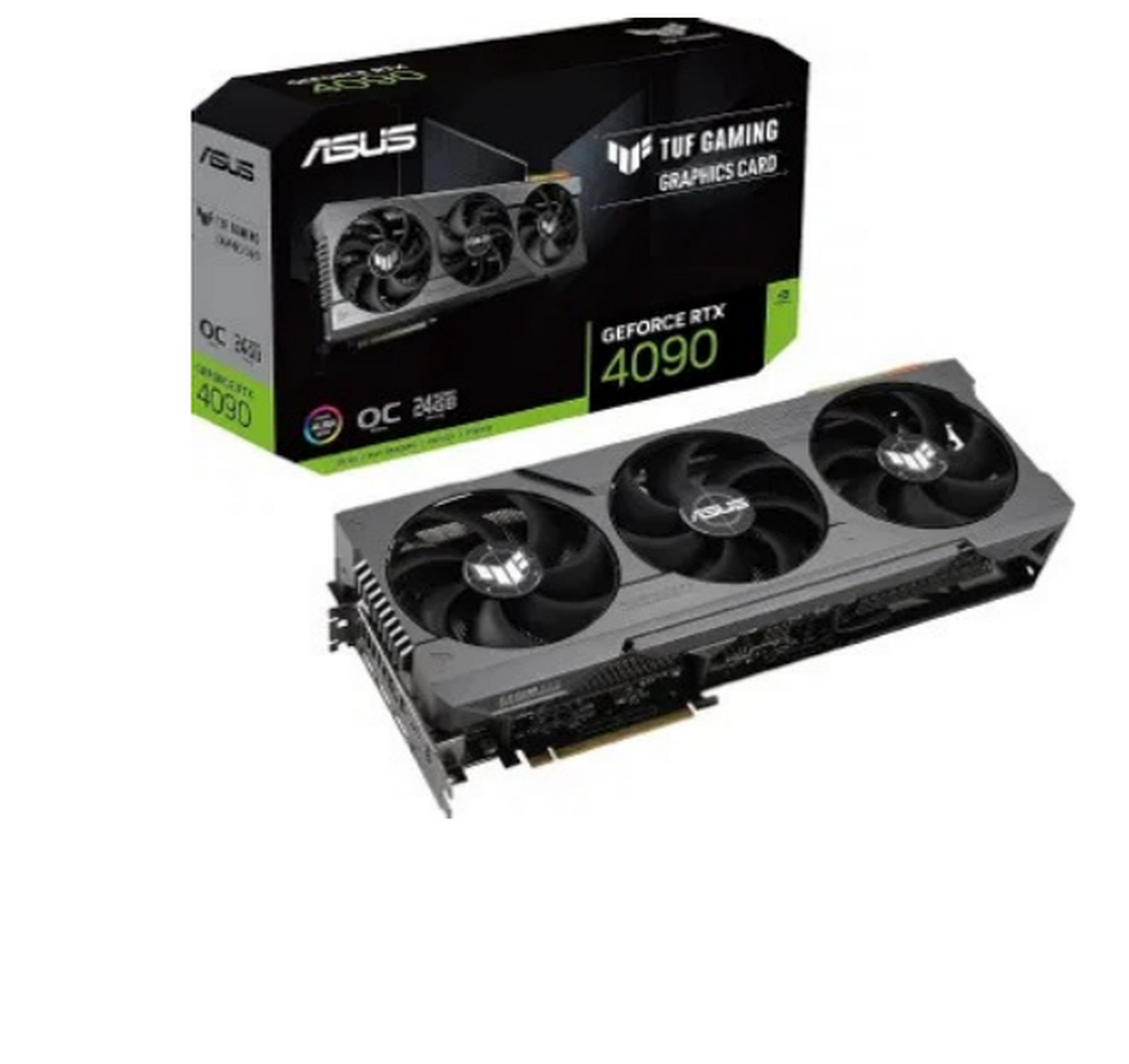
Don't settle for "good enough" today only to regret it tomorrow. If you're unsure which card fits your budget, our team is always ready to offer personalized solutions tailored to your gaming goals.
3. The "I Can Fix It" RAM Slot Shuffle
You’d be surprised how many stellar rigs underperform simply because the RAM is in the wrong slots. Most motherboards require you to use slots 2 and 4 (A2 and B2) to enable dual-channel mode.
Placing them side-by-side often drops your memory bandwidth in half, leaving unrivaled performance on the table. Also, in 2026, mixing different brands or speeds of DDR5 is a recipe for a bluescreen disaster. Buy one matched kit, seat it until you hear that satisfying click, and utilize our expertise if the BIOS doesn't recognize your speeds.
4. Suffocating Your Components
Airflow is the lifeblood of your PC. We often see builders install all their fans as "exhaust," creating a vacuum that sucks in dust through every crack, or worse, "intake" only, which turns the case into a slow cooker.
A balanced approach: intake at the front and bottom, exhaust at the top and rear: is essential. Furthermore, if you’re using an All-In-One (AIO) liquid cooler, ensure the pump isn't the highest point in the loop to avoid air bubbles and annoying gurgling noises.
5. The M.2 SSD Thermal Throttling
We love NVMe SSDs for their blistering speeds, but PCIe Gen 5 and Gen 6 drives run hot. Many builders forget to use the heatsinks included with their motherboards or, worse, leave the "remove before use" plastic film on the thermal pad.
If your drive hits its thermal limit, your load times will tank. For a truly seamless experience, ensure your high-speed storage has adequate cooling.
6. The "Motherboard HDMI" Classic
It happens to the best of us. You finish the build, plug in the monitor, and... the graphics look like a 1990s spreadsheet. Why? Because the HDMI or DisplayPort cable is plugged into the motherboard instead of the graphics card.
A balanced approach: intake at the front and bottom, exhaust at the top and rear: is essential. Furthermore, if you’re using an All-In-One (AIO) liquid cooler, ensure the pump isn't the highest point in the loop to avoid air bubbles and annoying gurgling noises.
7. Skipping the "Hassle-Free" BIOS Update
In 2026, hardware moves fast. Out-of-the-box motherboards often lack the latest microcode needed to run the newest CPUs or high-speed RAM stably. Skipping a BIOS update can lead to phantom crashes that are a nightmare to diagnose.
Updating your BIOS might feel intimidating, but it’s a proven step toward peak performance and long-term reliability.
Craft Your Ultimate Gaming Experience
Building a PC should be an exciting journey, not a source of frustration. If the thought of cable management, BIOS flashing, or component compatibility feels overwhelming, remember: we come to you.
At
Home Net Computer Repair, we specialize in bespoke gaming builds and upgrades. We offer a convenient pick-up and return service, using only top-quality parts to ensure your rig remains a powerhouse for years to come. Our family-owned business cares about your frame rates as much as you do.